How-to guide
How to measure bowling speed with your phone
You can measure your bowling speed with just your phone. Put it on a tripod behind the bowler's stumps, line up both sets of stumps on screen and bowl as normal. The app follows the ball and shows the speed of every delivery, in mph or km/h, with a clip to watch back. You don't need anyone to help.
Can you check your bowling speed on your phone?
Yes. An app can use the phone's camera to follow the ball from your hand to the far stumps and works out how fast it was going. All you need is the phone, a tripod and a full-length pitch with stumps at both ends, in the nets or out in the middle.
The phone sits on a tripod, so it checks every ball you bowl and you can watch any of them back. If you're weighing up a radar gun as well, our guide cricket speed gun or a speed gun app? explains how each one reads the ball.
What is bowling speed?
Bowling speed is how fast the ball is travelling as it leaves your hand. That's called release speed, and it's what people usually mean when they talk about pace. You can read it in mph or km/h, and it's easy to convert between the two.
km/h and mph
One mile is 1.609 km, so to turn km/h into mph, divide by 1.609.
130 ÷ 1.609 = 81 mph and 100 ÷ 1.609 = 62 mph.
Going the other way, 80 mph × 1.609 = 129 km/h.
YORKER AI gives your bowling speed in either. The ball is at its fastest at release. It slows a little through the air and loses more pace when it bounces, so it's always going slower by the time it reaches the batter. Release speed is the one worth tracking, because it's the part your run-up and action decide.
How does a bowling speed app work out your speed?
A neural network trained on cricket footage finds the ball in every frame, and the stumps at both ends give the app the scale of your net. From those it works out how far the ball travelled and how long it took, and speed is distance divided by time.
Bowling speed is distance divided by time
At 60 frames a second, each frame lasts 1 ÷ 60 s = 16.7 ms.
Say the 3D path shows the ball covering 6.0 m in 10 frames. That's 10 ÷ 60 = 0.167 s.
So the speed is 6.0 m ÷ 0.167 s = 36 m/s.
In everyday units, 36 × 3.6 = 129.6 km/h: call it 130 km/h, or 81 mph.
The 22-yard pitch is what turns positions on the screen into metres, which is why the app needs to see both sets of stumps. The bowling speed app page sets out the method step by step, and how ball tracking works explains the 3D part.
How to measure your bowling speed with YORKER AI
Set the phone up behind the bowler's end, line up the stumps, then bowl. YORKER AI picks up each delivery on its own and shows its bowling speed. Setup takes about thirty seconds, and you don't touch the phone between balls.
- Put your phone on a tripod behind the bowler's stumpsStand it in line with the middle of the pitch, in portrait, at about head height and out of your run-up. You want your last few strides and both sets of stumps in the picture.
- Line up the stumpsStart a session, get the batter's stumps in the far box and the bowler's stumps in the near box, then hold still and calibrate. That tells the app where the pitch is.
- Bowl as normalYORKER AI finds the ball in every frame and recreates its 3D trajectory from your hand to the batter. There's no timer to start and nothing to tap.
- See your bowling speed on every ballEach delivery is clipped for you with its speed, line and length. Swipe through the session like Reels and watch any ball back.
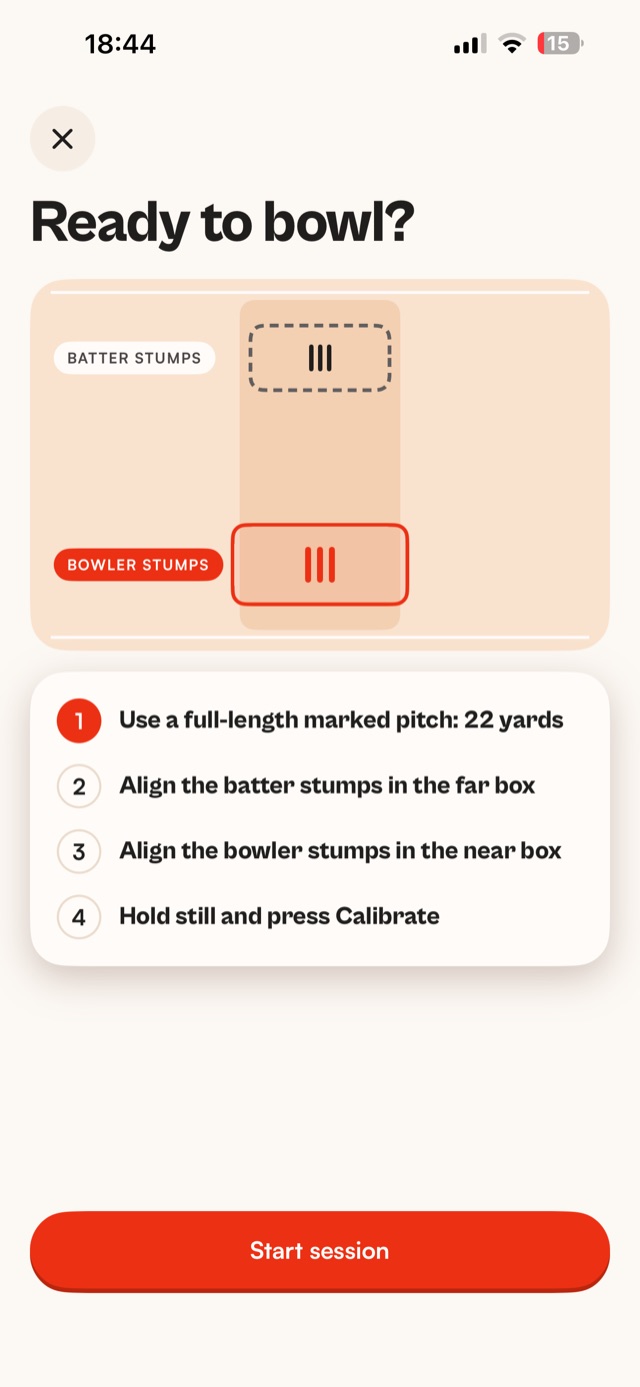
You don't need signal in the nets. The tracking runs on the phone, so every ball is measured as you bowl, and your sessions sync to your account once you're back online.
How do you get a good reading?
Give the app a clear, steady view of the whole pitch. Most bad readings come from a phone that moved, stumps that were cut off, or a ball that was hard to see.
- Use a tripod and leave it alone. A hand-held phone moves, and the app needs the camera to stay where it was when you lined up the stumps.
- Keep both sets of stumps in view. If the far stumps look tiny, move the tripod a little closer.
- Bowl on a full-length pitch. The app works from a 22-yard pitch, so a shorter one throws the numbers off.
- Get good light. Keep the sun behind or beside the phone, never in the lens. Indoor nets are fine.
- Keep the lane clear. Nobody standing between the phone and the bowler, and nobody walking behind the far stumps if you can help it.
Our guide to phone tripod setup in the nets goes through the setup in more detail.
What should you do with your bowling speed?
Track it. One quick ball doesn't tell you much, but your typical bowling speed across a session, and how it moves over a season, shows whether your training is working.
Measure the same way each time, with the same setup and after the same warm-up, and look at a whole set of balls rather than the fastest one.
If you want to add pace, how to bowl fast covers a repeatable run-up, practising with a purpose and how to test one change at a time.
Measure every ball you bowl
Track your bowling speed with YORKER AI, coming to the App Store for iPhone. Put your phone behind the bowler's end, line up the stumps and bowl. Every delivery gets its bowling speed, line, length, swing, spin and 3D trajectory, with a clip of each one.
See everything it measures on the bowling speed app page.
Quick answers
Do I need someone to help me measure my bowling speed?
No. Put the phone on a tripod behind the bowler's stumps, line up both sets of stumps and bowl. The app picks up each delivery on its own, so you can measure a whole session by yourself.
Can I measure my bowling speed at home?
Only if you have room for a full 22-yard pitch with stumps at both ends. Most gardens are too short, so the nets at your club or an indoor centre are usually the easier place.
Which phone do I need?
YORKER AI works on iPhone 12 or later, running iOS 18 or later. It's an iPhone app, so there isn't an Android version.
Does it work for spin bowling?
Yes. Spinners get their bowling speed like anyone else, and YORKER AI also measures spin: how far the ball turned off the pitch.